#001 AI Coding in Practice: An Indie Developer's Document-First Approach
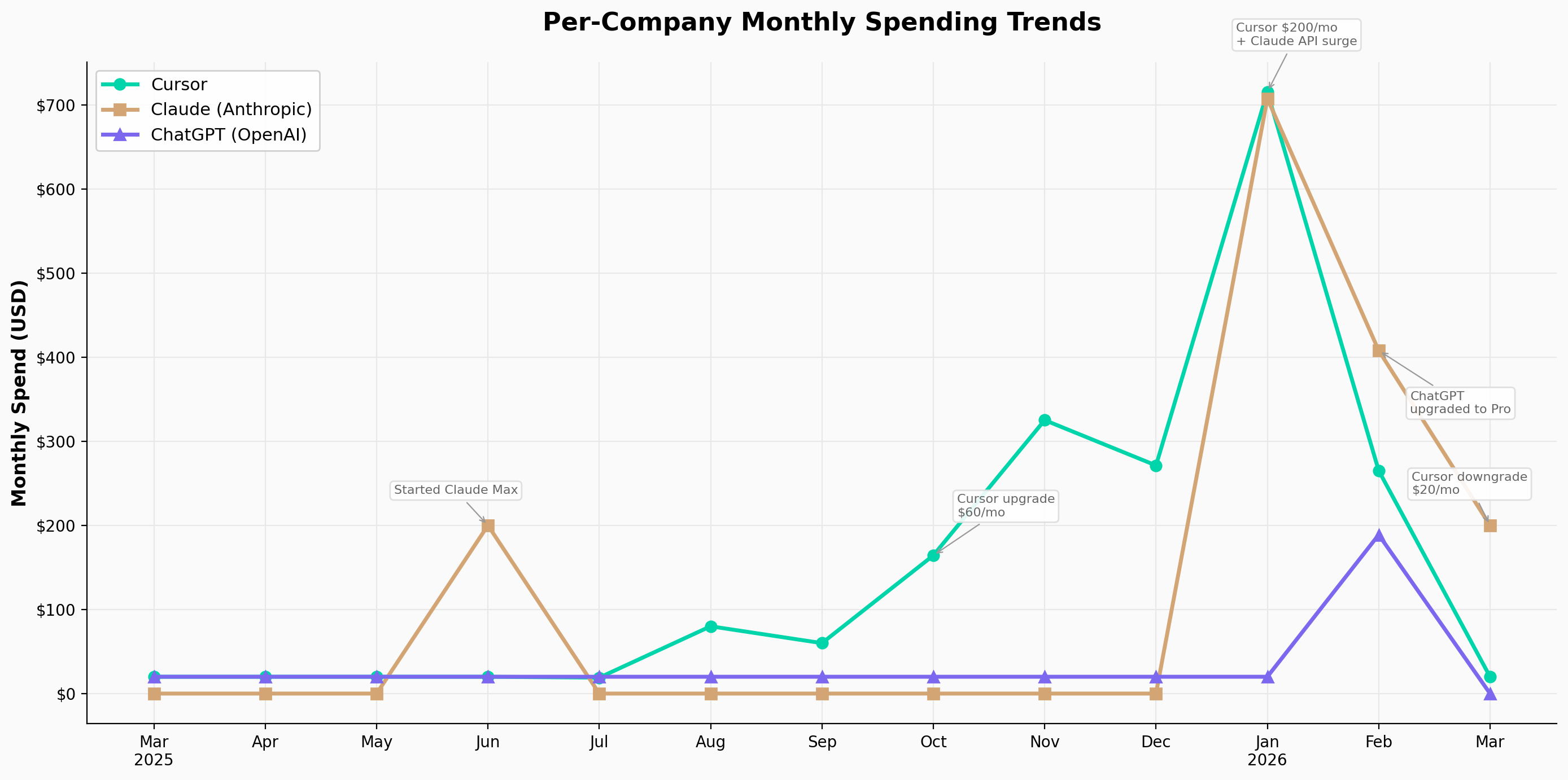
I’m a software engineer — six years at Yelp in the US before going indie. Three years ago I started a sailing-themed management sim as a side project; last August, I quit my job and moved back to China to work on it full-time.
Since then, AI coding tools have essentially become my primary workforce. I’ve spent close to $4,000 on them since March 2025, made plenty of mistakes along the way, and gradually developed a set of workflows that are relatively stable. I work within a small team of three, but we each own relatively orthogonal modules, so in practice my day-to-day development is mostly solo — and the workflows below reflect that context.
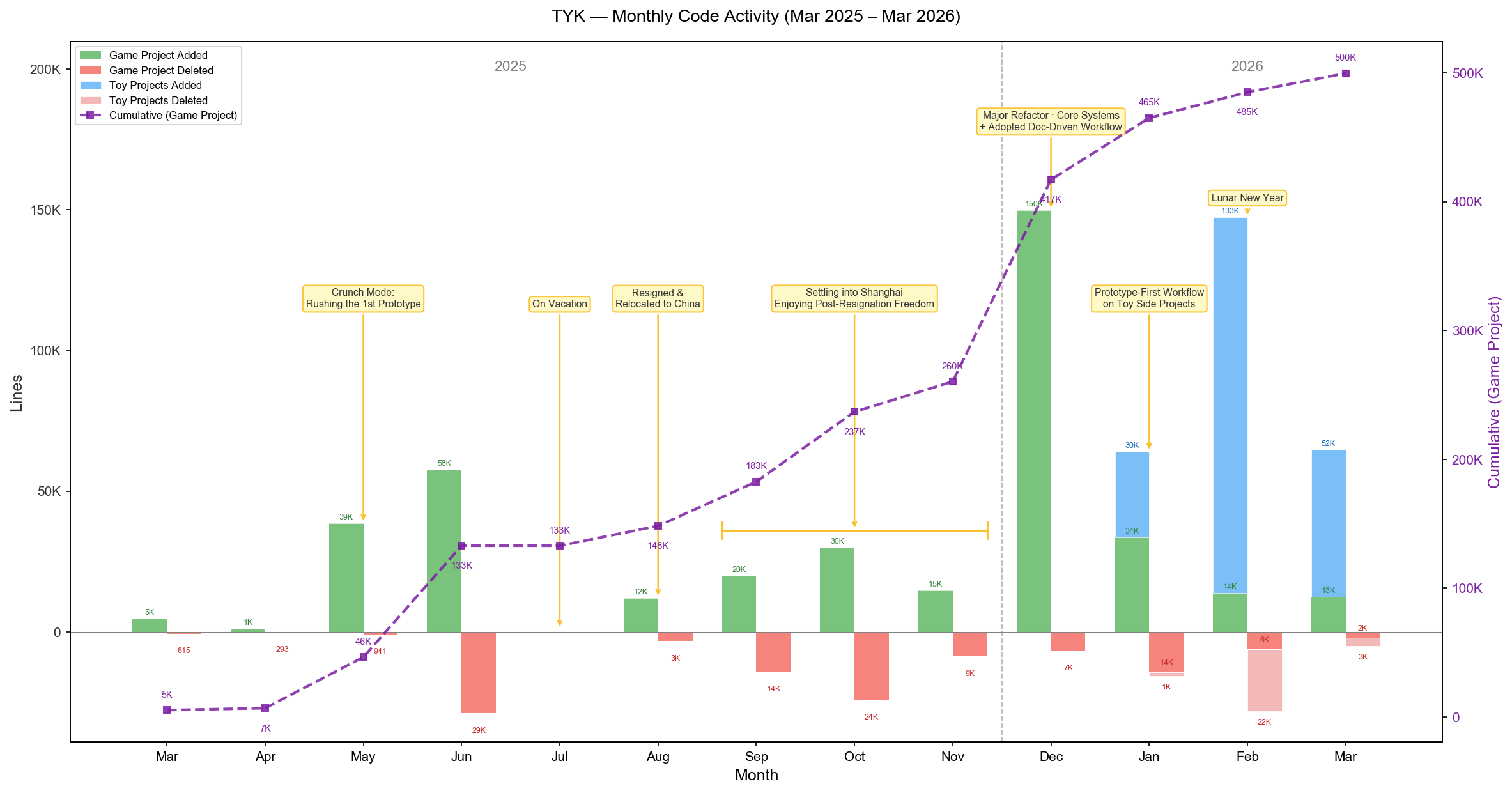 Monthly code activity over the past year (green = game project additions, blue = experimental project additions)
I primarily use Claude Code and Codex, so the specific examples reference those tools, but the underlying concepts transfer to any capable agent.
Part 1: Two Workflows
I currently operate with two distinct workflows, chosen based on the nature of the task:
- Document-driven development – for large, well-scoped features
- Prototype-driven development – for small features or ones where the requirements are still fuzzy
Workflow 1: Document-Driven Development
In this workflow, the document is a first-class citizen. The entire workflow is built around it. Here’s how it breaks down phase by phase.
flowchart LR
    P1[Phase 1<br/>Divergent<br/>Exploration]:::ai --> P2[Phase 2<br/>Write PRD]:::human
    P2 --> P3[Phase 3<br/>Plan +<br/>Review]:::ai
    P3 --> P4[Phase 4<br/>Implement]:::ai
    P4 --> P5[Phase 5<br/>Test +<br/>Iterate]:::review
    P5 --> P6[Phase 6<br/>Manual<br/>Code Review]:::review
    P6 --> PR[Unit Tests<br/>+ Open PR]:::done

    P5 -.->|Deviation?<br/>Update PRD first| P2
    P6 -.->|Not satisfied?<br/>Back to PRD| P2

    classDef human fill:#EF4444,color:#fff,stroke:none
    classDef ai fill:#2563EB,color:#fff,stroke:none
    classDef review fill:#F59E0B,color:#fff,stroke:none
    classDef done fill:#10B981,color:#fff,stroke:none
Phase 1: Divergent Exploration
Say you’re building a theme park simulation game. You’ve already implemented a building placement system and a road construction system. Next up: a visitor system.
At this point, you probably have a vague sense of the shape – visitors spawn, walk along roads, enter rides, interact with attractions, generate revenue, affect park ratings, shift in mood. But the specifics are still fuzzy.
This is where AI shines. You take your scattered, half-formed thoughts and hand them to the agent. Ask it to research similar games, flesh out your ideas, challenge your assumptions, and ask you clarifying questions. Crucially, at this stage, keep it away from technical concerns. Focus purely on game logic and design.
A prompt template I use frequently:
I'm designing a visitor system. [Feature description / draft feature spec]. Please:
1. Research similar systems in comparable games
2. Expand and refine the feature design

Give me 3 pure game-logic design proposals -- no technical implementation details. Save them to markdown files.
If anything is unclear, ask me.
If the proposals lack depth, you can explicitly ask the agent to spin up sub-agents for deeper research and have them write their findings into separate markdown files. Read through those research docs yourself – they often spark ideas you wouldn’t have arrived at alone.
Think of this phase’s output as what a team of game designers would hand you after a brainstorming session: broad, exploratory, directional.
Here’s what a section of agent output looks like for the visitor system prompt above. The output at this stage tends to be fairly concrete from a player’s perspective, but not concrete enough to write code against. Questions like “what’s the actual range for these values?”, “what are the state transitions between these behaviors?”, “how do we handle conflicts?”, “what does the underlying AI architecture look like?” – those are still unanswered. That’s fine. For this phase, that’s the right level of detail.
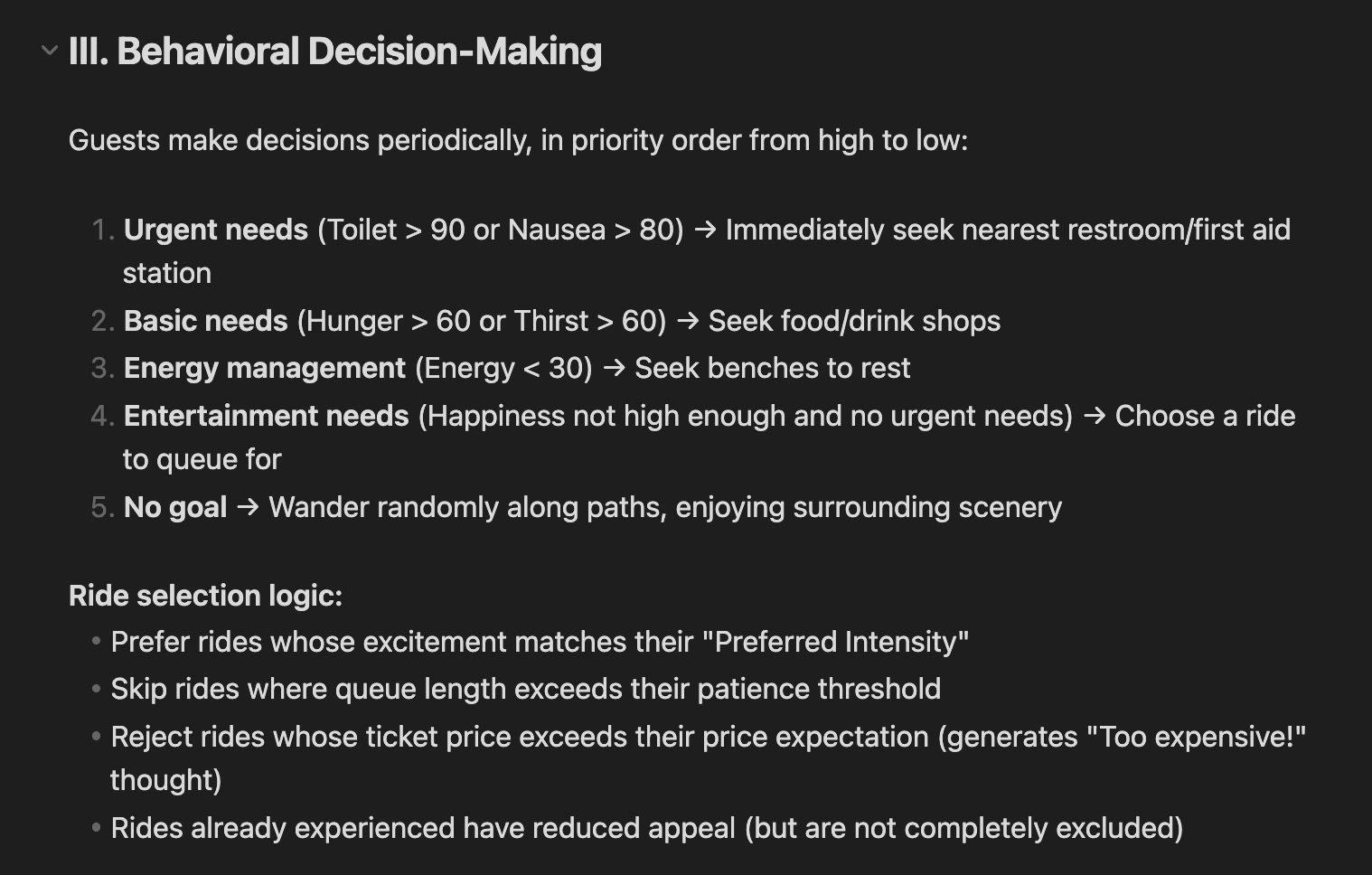 A snippet from the agent’s design proposal — concrete enough from a player’s perspective, but not yet detailed enough for implementation
Phase 2: Writing the PRD
This is the most human-intensive phase in the entire workflow – and the most important one. I regularly spend 50% or more of my total development time here. The document you produce becomes a core asset of your project.
In this phase, you read through the previous phase’s output and iterate on it with the agent: cutting, rewriting, refining, and above all, adding specificity. By the end, you should have stripped it down to exactly what you intend to build right now.
The deliverable is a detailed software behavior specification – a PRD.
A quick aside: I don’t think there’s a one-size-fits-all template for PRDs. The right format depends on the type of software, the scale of the system, and the team’s preferences. I’ve written and read all kinds of documents in my career, and the variation is enormous.
That said, there are a few things I always include:
1. A glossary. If you want a system to be described precisely, you need precise definitions of the terms that compose that description. In our theme park example: what exactly is a visitor’s “happiness value”? What other systems does it affect? Does a visitor’s decision produce a stackable set of states or a single behavior? Does “attraction” include shops? If you don’t resolve these ambiguities upfront, the AI will fill in the blanks with its own interpretation – and by the time you notice, it may have written hundreds of lines of code based on a wrong assumption.
2. Interaction model. How does the user interact with this system? Are visitors auto-generated or manually summoned by the player? Can the player control individual visitors? What input triggers what behavior? This section defines the most critical layer: the player-facing interface.
3. Acceptance criteria. This is really boundary definition. With finite time, you can’t endlessly expand and polish a system. You need to specify how the system handles edge cases and where its scope ends. A secondary benefit: these natural-language acceptance criteria translate almost directly into test code, which protects you from regression bugs as the system evolves – something that matters enormously when code is being produced at the pace agents enable.
For a concrete example, here’s a PRD we’ve actually used and continue to maintain in our project: Construction System PRD. I don’t think there’s a universal format, but I hope it gives you a sense of what one can look like.
Phase 3: Plan and Review
With the design work done, we move into implementation. The first step in my workflow is almost always: have the agent produce an implementation plan based on the PRD.
The PRD is mostly a behavioral specification. Even if it touches on technical direction – the stack, rough API shapes, boundaries – it deliberately stops short of specifying which files to modify, step-by-step instructions, or sample code.
If you maintain tight control over technical details and your document is already at that level of specificity – one you’ve validated through practice, where the agent can code directly against it – you can skip this phase entirely.
After the agent produces its plan, I strongly recommend reviewing it – either manually or with another agent.
In practice, I use Claude Code’s plan mode to generate the plan, then have it invoke Codex to review it, and then let Claude fix issues based on the review feedback. Two rounds of review is usually enough to catch any critical problems. A final quick scan by a human, and you’re ready to implement.
flowchart LR
    CC["Claude Code<br/>Create Plan"] --> CDX["Codex<br/>Review (+ Fix)"]
    CDX --> FIX["Claude Code<br/>Fix Based on Feedback"]
    FIX -->|"Repeat ~2 rounds"| CDX
    FIX --> HUMAN["Human<br/>Final Check"]
    HUMAN --> IMPL["Start Implementing"]

    style CC fill:#2563EB,color:#fff,stroke:none
    style CDX fill:#10B981,color:#fff,stroke:none
    style FIX fill:#2563EB,color:#fff,stroke:none
    style HUMAN fill:#EF4444,color:#fff,stroke:none
    style IMPL fill:#E5E7EB,color:#1F2937,stroke:none
One more thing: explicitly requesting TDD in this phase noticeably improves development efficiency and reduces error surface. Here’s the prompt I typically use:
Read [document]. Design an implementation plan using TDD.

If anything is unclear, ask me.
A note on why I pair Claude Code for planning and Codex for review: over the past several months, I’ve found they have complementary personalities. Claude Code is the senior engineer who’s been at the company for five years – great communicator, strong big-picture thinker, experienced in everything, but tends to cut corners on implementation details and never quite finishes the job. Codex is the fresh graduate, armed with theoretical knowledge, eager to prove themselves through technical rigor, laser-focused on details, capable of going incredibly deep in a given direction – but not great at communication or documentation. So I let each handle what they’re best at. Your mileage may vary, but experimenting with different models for different roles is always worthwhile.
block-beta
    columns 2

    block:CC:1
        columns 1
        CC_TITLE["Claude Code"]
        CC1["Great communicator"]
        CC2["Big-picture thinker"]
        CC3["Tends to cut corners"]
        CC4["Doesn't sweat the details"]
        CC5["→ Best for: Planning / Docs"]
    end

    block:CDX:1
        columns 1
        CDX_TITLE["Codex"]
        CDX1["Laser-focused on details"]
        CDX2["Goes deep in any direction"]
        CDX3["Weak at communication"]
        CDX4["Struggles with documentation"]
        CDX5["→ Best for: Review / Deep impl"]
    end

    style CC_TITLE fill:#60A5FA,color:#fff,stroke:none
    style CC1 fill:#EFF6FF,color:#1E40AF,stroke:#BFDBFE
    style CC2 fill:#EFF6FF,color:#1E40AF,stroke:#BFDBFE
    style CC3 fill:#EFF6FF,color:#1E40AF,stroke:#BFDBFE
    style CC4 fill:#EFF6FF,color:#1E40AF,stroke:#BFDBFE
    style CC5 fill:#60A5FA,color:#fff,stroke:none

    style CDX_TITLE fill:#34D399,color:#fff,stroke:none
    style CDX1 fill:#ECFDF5,color:#065F46,stroke:#A7F3D0
    style CDX2 fill:#ECFDF5,color:#065F46,stroke:#A7F3D0
    style CDX3 fill:#ECFDF5,color:#065F46,stroke:#A7F3D0
    style CDX4 fill:#ECFDF5,color:#065F46,stroke:#A7F3D0
    style CDX5 fill:#34D399,color:#fff,stroke:none
Phase 4: Implementation
During implementation, you can step back and let the agent work. If you want to maximize efficiency, spin up a new worktree for an orthogonal feature. I typically run one major feature alongside two or so smaller changes in separate worktrees, which minimizes idle time for the human in the loop.
flowchart TD
    MAIN["main branch"] --> FEAT["feature branch<br/>Major feature (Agent working)"]
    FEAT --> WT1["worktree 1<br/>Small change A"]
    FEAT --> WT2["worktree 2<br/>Small change B"]

    FEAT -->|"Agent coding<br/>you're waiting"| WAIT["⏳"]
    WAIT -.->|"Switch to small task<br/>reduce idle time"| WT1
    WAIT -.->|"Switch to small task<br/>reduce idle time"| WT2

    WT1 -->|"Done ✓"| MERGE_WT["Merge back to feature"]
    WT2 -->|"Done ✓"| MERGE_WT
    FEAT -->|"Major feature done ✓"| MERGE_WT
    MERGE_WT --> MERGE_MAIN["Merge back to main"]

    style MAIN fill:#E5E7EB,color:#1F2937,stroke:none
    style FEAT fill:#2563EB,color:#fff,stroke:none
    style WT1 fill:#10B981,color:#fff,stroke:none
    style WT2 fill:#10B981,color:#fff,stroke:none
    style WAIT fill:#F59E0B,color:#fff,stroke:none
    style MERGE_WT fill:#8B5CF6,color:#fff,stroke:none
    style MERGE_MAIN fill:#E5E7EB,color:#1F2937,stroke:none
Phase 5: Test and Iterate
After implementation, similar to the planning phase, have the AI review its own code for a few rounds and self-correct. Don’t focus too deeply on code quality at this stage – that’s the next phase. This step is about catching potentially serious, destructive bugs.
After the code-level review, do a functional review. For my Unity-based project, I experimented with using an open-source Unity MCP to let the agent drive automated functional testing, but the results were underwhelming. I’ve settled on manual testing as the primary approach, supplemented by purpose-built tooling for the most tedious parts.
When functional testing reveals deviations between implementation and design – or you simply realize the feature doesn’t feel the way you expected – my advice is to start from the document. Update the PRD first, then re-run the workflow, emphasizing or skipping phases as needed.
Phase 6: Manual Code Review
This is the final and second-most time-consuming phase. It’s not fundamentally different from how you’d review code before the age of agents, so I won’t belabor it. The difference is that you can ask the AI to highlight review priorities, trace logical threads, and then discuss and implement changes collaboratively.
Here’s a real prompt I used recently:
Compare the current branch against main. I'm preparing to review all changes.
Give me a review checklist, sorted by priority. You can spin up an agent team
or use sub-agents to prepare the checklist.

Notes:
1. If you use git diff, you'll find a lot of changes. Handle this flexibly.
2. Understand the changes, then give me a checklist for manual review.
I should address the counterargument: in some vibe-coding philosophies, any human intervention is considered “friction” and manual review is actively discouraged. As of early 2026, skipping human review entirely just doesn’t work. Current models have clear capability boundaries. They cannot independently produce a maintainable system of meaningful complexity. From a maintainability perspective, humans are still an essential part of the loop. (Some argue that as long as AI-written code is maintainable by AI, that’s sufficient. In my experience, maintaining a system is never less complex than building one from scratch – often more so. I don’t believe an AI that can’t build a maintainable system can reliably maintain one either.)
The Full Cycle
That’s the full cycle. The work is repeating these six phases until you’re satisfied with the result.
Before opening a PR, I typically do one more quick pass: have the agent plan and implement a batch of unit tests. I’ll admit I’m not always rigorous about this. But I will say this: the cost of agent-written tests is essentially zero, and the difference between having them and not having them is substantial. If they ever stop being useful, you can delete them all and regenerate from scratch. There’s no downside.
For all the changes just made, design tests. Ensure the tests are:
1. Concise and maintainable
2. Covering only critical logic
3. Focused on system boundaries, not internal implementation details

If anything is unclear, ask me.
Workflow 2: Prototype-Driven Development
The second workflow is less structured – and honestly, it’s the more natural one. Many developers are probably already doing it daily.
For smaller features, or features where the requirements are genuinely unclear, you can skip documentation entirely and let a prototype lead the way. If a feature is small enough, the overhead of running the full document-driven process exceeds the cost of just building the thing. For truly ambiguous requirements, writing a spec upfront is a waste of effort – you’re better off letting the AI build something barely functional, getting your hands on it, developing intuition for what you actually want, and then iterating.
This approach works especially well for systems that have strong prior consensus – things the model has already learned thoroughly during training. You don’t need to painstakingly explain how a Mario-style platformer movement system should work. The AI already knows. Tell it what you want, and it’ll get you 80-90% of the way there. Start with a rough prototype, and once you have it, just keep layering new functionality on top.
Of course, you’ll inevitably hit a point where the system’s complexity outgrows what you can manage through conversation alone. But by then, you’ll have a concrete understanding of what the system actually does. At that point, have the agent read the codebase, generate a proper specification from the current implementation, and switch to the document-driven workflow to rebuild it properly. This is how you successfully transform a fuzzy idea into something with clean logic and solid architecture.
flowchart LR
    IDEA["Fuzzy Idea"] --> PROTO["Prototype via<br/>Conversation"]
    PROTO --> CHECK{Complexity<br/>outgrown?}
    CHECK -->|No, keep iterating| PROTO
    CHECK -->|Yes| GEN["AI reads code<br/>generates spec"]
    GEN --> DOC["Switch to<br/>doc-driven workflow"]

    style IDEA fill:#E5E7EB,color:#1F2937,stroke:none
    style PROTO fill:#2563EB,color:#fff,stroke:none
    style CHECK fill:#F59E0B,color:#fff,stroke:none
    style GEN fill:#10B981,color:#fff,stroke:none
    style DOC fill:#EF4444,color:#fff,stroke:none
Document Lifecycle
One more thing before moving on: the lifecycle of these documents.
Once a document is established, how long it lives depends entirely on the nature of the system it describes. Some documents need continuous maintenance; others are disposable.
Continuous maintenance. This is my default. The document doesn’t get discarded after implementation – it evolves alongside the code. You maintain it the way you used to maintain code in the pre-AI era: when you change a feature, you start by updating the document. When code and documentation diverge, you reconcile them. With agent assistance, this is less painful than it sounds.
Disposable. Sometimes, once a feature is fully implemented and tested, the document has served its purpose. You embrace the philosophy that the code itself is the documentation. With AI as an intermediary layer, the cost of understanding code is dramatically lower than it used to be.
To decide which approach to use, I apply a simple two-axis framework:
- X-axis: How well the system can be described in natural language (including formal tools like finite state machines or well-defined mathematical models). Right side = easy to describe; left side = hard to describe.
- Y-axis: How critical the system is. Top = core system; bottom = peripheral system.
quadrantChart
    title Document Lifecycle
    x-axis "Hard to describe" --> "Easy to describe"
    y-axis "Peripheral" --> "Core system"
    quadrant-1 "Q1: Maintain continuously"
    quadrant-2 "Q2: Case by case"
    quadrant-3 "Q4: Skip docs entirely"
    quadrant-4 "Q3: Likely disposable"
These classifications aren’t static – systems evolve during development, and their importance and describability shift over time. You’ll need to reassess periodically. But systems in the first quadrant – core and easy to describe – have the highest ROI for continuous documentation. For me, maintaining their documents is non-negotiable. For other quadrants, use your judgment.
Part 2: Why Documentation Is the Core
Now I want to step back and share the thinking behind this document-centric approach. Why do I believe that, as of early 2026, investing sustained effort in maintaining documentation for your core systems is necessary?
Your Role Has Been Involuntarily Upgraded
Many responsibilities that once belonged to junior and mid-level individual contributors can now be handled by agents. As a result, these engineers are naturally evolving into senior roles. Where you once spent months heads-down writing code, the agent now does most of that work. Your job is to supervise and set direction.
In other words, “oversight and strategic direction” – a responsibility that used to belong to senior engineers or engineering managers – has landed on your plate.
block-beta
    columns 2

    block:BEFORE:1
        columns 1
        B_TITLE["Traditional Development"]
        B1["You: write code, debug, test"]
        B2["Senior/Manager: set direction"]
    end

    block:AFTER:1
        columns 1
        A_TITLE["AI Coding Era"]
        A1["Agent: write code, debug, test"]
        A2["You: set direction + maintain docs"]
    end

    style B_TITLE fill:#E5E7EB,color:#1F2937,stroke:none
    style B1 fill:#F9FAFB,color:#1F2937,stroke:#E5E7EB
    style B2 fill:#F9FAFB,color:#9CA3AF,stroke:#E5E7EB

    style A_TITLE fill:#60A5FA,color:#fff,stroke:none
    style A1 fill:#EFF6FF,color:#1E40AF,stroke:#BFDBFE
    style A2 fill:#EFF6FF,color:#1E40AF,stroke:#BFDBFE
But agents still lack the autonomy and long-term memory of a real human colleague. You still need to maintain a meaningful depth of understanding of your project to keep it on track. The cognitive load is lighter than writing the code yourself, but heavier than what senior engineers or managers typically carried for their projects in the past.
Your Bandwidth Has Been Involuntarily Expanded
Increased productivity inevitably means you’re responsible for more – either larger project scope or more projects running in parallel. For me, the multiplier has been roughly 5-10x.
block-beta
    columns 2

    block:BEFORE:1
        columns 1
        B_TITLE["Traditional Development"]
        B1["Scope: 1x"]
        B2["Write every line yourself"]
        B3["Remember all code details"]
    end

    block:AFTER:1
        columns 1
        A_TITLE["AI Coding Era"]
        A1["Scope: 5~10x"]
        A2["Agent writes code, you steer"]
        A3["Docs = your long-term memory"]
    end

    style B_TITLE fill:#E5E7EB,color:#1F2937,stroke:none
    style B1 fill:#F9FAFB,color:#1F2937,stroke:#E5E7EB
    style B2 fill:#F9FAFB,color:#1F2937,stroke:#E5E7EB
    style B3 fill:#F9FAFB,color:#1F2937,stroke:#E5E7EB

    style A_TITLE fill:#60A5FA,color:#fff,stroke:none
    style A1 fill:#EFF6FF,color:#1E40AF,stroke:#BFDBFE
    style A2 fill:#EFF6FF,color:#1E40AF,stroke:#BFDBFE
    style A3 fill:#EFF6FF,color:#1E40AF,stroke:#BFDBFE
Keeping even the technical architecture of all those projects in your working memory, let alone the code-level details, is impossible for most people.
Documentation Has Become Your Source Code
This is where documentation becomes indispensable. It is the abstraction layer above code – the primary interface between you and the systems you’re responsible for.
Documentation sacrifices most of the detail but preserves the structural skeleton of a project. Because it’s written in natural language, reading, remembering, and modifying documentation costs far less mental effort than doing the same with code.
And with agents, the cost of translating documentation into working code has already dropped significantly – and continues to fall rapidly. The boundary between natural language and code implementation, with agents serving as a translation layer, is blurring. Even if we view current agents as fundamentally non-deterministic, the relationship between natural language and high-level programming languages is trending toward the same relationship that high-level languages once had with assembly. Eventually, engineers won’t need to master programming languages at all – they’ll focus on architecture and behavioral logic.
In the emerging era of AI-assisted development, writing and maintaining documentation carries the same importance that writing and maintaining code did before.
block-beta
    columns 2

    block:BEFORE:1
        columns 1
        A1["Traditional Development"]
        A2["Documentation<br/>(optional, often stale)"]
        A3["High-Level Languages ← You work here"]
        A4["Machine Code"]
    end

    block:AFTER:1
        columns 1
        B1["AI Coding Era"]
        B2["Documentation / PRD ← You work here"]
        B3["High-Level Languages<br/>(Agent translates)"]
        B4["Machine Code"]
    end

    style A1 fill:none,stroke:none,color:#6B7280
    style A2 fill:#F3F4F6,color:#1F2937,stroke:none
    style A3 fill:#FDE68A,color:#92400E,stroke:none
    style A4 fill:#E5E7EB,color:#374151,stroke:none
    style B1 fill:none,stroke:none,color:#3B82F6
    style B2 fill:#FDE68A,color:#92400E,stroke:none
    style B3 fill:#E5E7EB,color:#374151,stroke:none
    style B4 fill:#E5E7EB,color:#374151,stroke:none
Looking Ahead
I do believe that once agents close the gap on long-term memory and proactive behavior, we may not need to actively maintain documents either. The responsibilities that once belonged to individual contributors could be fully delegated to agents. But until that day comes, this is the best approach I’ve found.
Part 3: Lessons Learned
Some scattered advice and observations from the past year.
1. Plan First, Implement Second
There’s a saying in data analysis: garbage in, garbage out. It applies equally to AI-assisted development. The more context you provide, the better the output. Even if you want to cut every other corner, at least use the built-in plan mode in Claude Code or Codex before jumping to implementation.
2. Let the Agent Write Tests – Zero Cost, Infinite ROI
They don’t need to be perfect. The gap between imperfect tests and no tests at all is enormous.
3. Turn Routines into Skills
Don’t do it yourself – have the agent script your repetitive manual workflows and package them as reusable skills: auto-compile after changes, run tests, parse logs, and so on. This saves a surprising amount of time and drastically reduces context-switching overhead.
4. Stop Obsessing Over Code Details
If you’re scrutinizing code the same way you did in the pre-AI era, you’re probably not leveraging AI effectively. This doesn’t mean “don’t read code” – you absolutely should. But focus on the trunk: architecture, inter-system boundaries, and how they evolve over time. When something goes wrong at that level, refactor decisively.
5. Keep Your Toolchain Lightweight
Unless you’re genuinely interested in tooling or it directly benefits your project, don’t spend too much time on the tool stack. Earlier this year, I tried building my own multi-agent orchestration system. It cost a lot and didn’t produce meaningfully better results. I tried opencode – decent, but poor cost-efficiency compared to Claude Code and Codex. Once I simplified down to just Claude Code plus Codex, my output stayed high and my overhead dropped.
A related observation: if your resources are limited, don’t build tooling that foundation-model companies are about to ship themselves. The odds are high that your tooling investment will be obsoleted before you recoup the development cost.
My short-term read on where agent tooling is heading: seamlessness. Features like /btw for seamless interaction are already here. I run multiple features across tmux panes simultaneously, and I want worktree creation and merging to be more automatic and intelligent; I want Claude Code to reprioritize my feature backlog on the fly based on ad-hoc input. My prediction: by the end of this year, we won’t need to manage worktrees manually at all. So if you’re thinking about building tooling in that space right now, the ROI is probably not there.
6. Scaling Beyond Solo
As mentioned at the top, this workflow has been validated primarily in a solo context. That said, I don’t think it’s inherently incompatible with larger teams. As each engineer’s ownership boundary expands with AI assistance, decomposing a project into orthogonal modules should actually become easier than before. If the decomposition is done well – clear boundaries, minimal shared state – each person can run this workflow independently within their domain. The coordination overhead shifts from “how do we co-author code” to “how do we define interfaces between modules,” which is a more tractable problem. But I haven’t tested this at scale. If I do, I’ll share what I learn.
Summary
Here’s the workflow decision tree:
flowchart TD
    START([New Feature]) --> DECIDE{Large &<br/>well-scoped?}

    DECIDE -->|Yes| DOC[Document-Driven<br/>6-Phase Pipeline]:::human
    DOC --> SAT[Satisfied > Open PR]:::done
    SAT --> LIFE{Core & easy<br/>to describe?}
    LIFE -->|Yes| MAINTAIN[Maintain doc<br/>continuously]:::done
    LIFE -->|No| DISCARD[Discard doc]:::gray

    DECIDE -->|No| PROTO[Prototype-Driven<br/>Conversational Dev]:::ai
    PROTO --> COMP{Complexity<br/>outgrown?}
    COMP -->|No| PROTO
    COMP -->|Yes| GEN[AI generates spec<br/>from codebase]:::ai
    GEN -->|Switch to<br/>doc-driven| DOC

    classDef human fill:#EF4444,color:#fff,stroke:none
    classDef ai fill:#2563EB,color:#fff,stroke:none
    classDef done fill:#10B981,color:#fff,stroke:none
    classDef gray fill:#6B7280,color:#fff,stroke:none
- Large, well-defined features: use document-driven development.
- For core systems that are easy to describe: continuously maintain the document.
- For everything else: use your judgment.
- Small or ambiguous features: use prototype-driven development. When a small feature grows into a large, well-defined one, switch to the document-driven workflow and rebuild it properly.
Everything above is written from the perspective of a front-line individual contributor. But I believe AI agents are transforming every role – and that transformation will inevitably reshape how teams and organizations operate. I hope this helps some of you build things you wouldn’t have attempted before.